In today’s digital India, governments are rapidly adopting technology to improve efficiency, transparency, and employee satisfaction. One such initiative is the HRMS (Human Resource Management System) of the Government of Bihar, available at HRMS Bihar Portal.
This portal has transformed how government employees manage their HR-related tasks like salary slips, leave applications, service records, and statutory deductions such as PF, ESI, and TDS.
In this detailed guide, you will learn:
- What HRMS Bihar is
- How it works in the Indian HR ecosystem
- Step-by-step login process
- How to check leave, PF, ESI, and TDS
- Key features and benefits
What is HRMS Bihar?
HRMS Bihar is an online digital platform launched by the Government of Bihar to manage all employee-related services in one place. It acts like a centralized HR system for lakhs of state government employees across departments such as education, police, health, and administration.
Earlier, employees had to rely on manual paperwork, office visits, and delays. Now, with HRMS:
- Salary slips are available online
- Leave can be applied digitally
- Service records are maintained electronically
- Payroll deductions are automated
This shift has significantly improved transparency and efficiency in government HR operations.
How HRMS Works in the Indian Government System
In India, HRMS systems are designed to handle statutory compliance and employee lifecycle management. Bihar’s HRMS functions similarly to private HR software but is customized for government rules.
The system integrates:
- Employee database (service book)
- Payroll processing
- Leave management
- Pension records
- Compliance (PF, ESI, TDS)
It ensures that all employee data is centralized, secure, and accessible anytime.
HRMS Bihar Login: Step-by-Step Guide
To access your account on the HRMS Bihar Portal, follow these steps:
Step 1: Visit the Portal
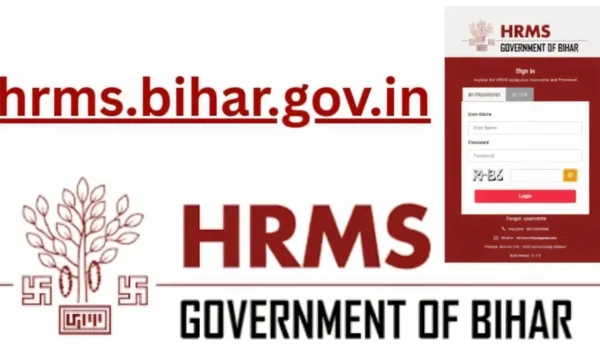
Go to the official website: hrms.bihar.gov.in
Step 2: Enter Login Details
You will see a login page where you can enter:
- User ID (Employee ID)
- Password
Alternatively, you can login via OTP (One-Time Password).
Step 3: Click Login
After entering credentials, click on “Login”.
Step 4: First-Time Login
If you are a new employee:
- Your ID is created by your department/ DDO
- You receive credentials via mobile/email
- Change password after first login
How to Check Leave in HRMS Bihar
The leave management system is one of the most used features.
Steps to Check Leave Balance:
- Login to HRMS portal
- Go to Leave Management
- Click on Leave Balance / Leave History
- View available leaves:
- Casual Leave (CL)
- Earned Leave (EL)
- Medical Leave (ML)
How to Apply for Leave:
- Select “Apply Leave”
- Choose leave type
- Enter dates and reason
- Submit
Your request goes directly to your DDO (Drawing and Disbursing Officer) for approval.
How to Check Salary, PF, ESI, and TDS
HRMS Bihar also works as a complete payroll system, similar to private HR software.
- Salary Slip Download
Steps:
- Login
- Go to Payroll / Salary Slip
- Select month & year
- Download PDF
The payslip includes:
- Basic salary
- HRA
- DA
- Deductions
- Provident Fund (PF)
PF is a retirement savings scheme governed by Employees’ Provident Fund Organisation.
How to Check PF in HRMS:
- Open salary slip
- Look for PF deduction section
- View employee + employer contribution
Typical PF structure:
- 12% employee contribution
- 12% employer contribution
- Employee State Insurance (ESI)
ESI is a health insurance scheme managed by Employees’ State Insurance Corporation.
How to Check ESI:
- Open payroll section
- View ESI deduction
Standard contribution:
- Employee: 0.75%
- Employer: 3.25%
- TDS (Tax Deducted at Source)
TDS is deducted under the Income Tax Act and shown in your payslip.
How to Check TDS:
- Go to payroll section
- Open salary slip
- Look for “Income Tax / TDS”
It includes:
- Monthly tax deduction
- Annual taxable income
Key Features of HRMS Bihar
- Employee Self-Service Portal
Employees can:
- Update personal details
- Download salary slips
- Track service history
- Digital Service Book
Complete employment history is stored digitally, reducing paperwork.
- Leave Management System
- Online leave application
- Real-time approval
- Leave balance tracking
- Payroll Automation
- Automatic salary calculation
- PF, ESI, TDS compliance
- Error-free processing
- Transparency & Accountability
Every action is recorded digitally, reducing corruption and delays.
Benefits of HRMS Bihar
For Employees
- No need to visit offices
- Easy access to salary & records
- Faster approvals
For Government Departments
- Reduced paperwork
- Better data management
- Improved efficiency
For HR Administration
- Centralized employee database
- Real-time analytics
- Better compliance tracking
Real-Life Example
Imagine a government teacher in Bihar:
Earlier:
- Had to visit office for leave approval
- Wait days for salary slip
- Maintain physical documents
Now with HRMS:
- Applies leave online in minutes
- Downloads salary instantly
- Tracks PF and tax deductions easily
This shows how HRMS simplifies daily work life.
Common Problems & Solutions
- Forgot Password
- Click “Forgot Password”
- Enter registered mobile
- Reset via OTP
- Login Not Working
- Check internet connection
- Ensure correct credentials
- Contact helpdesk
- Missing Data
- Contact DDO or HR department
- Data is updated by department only
HRMS vs Traditional HR System
| Feature | Traditional System | HRMS Bihar |
| Leave | Manual forms | Online |
| Salary Slip | Office visit | Instant download |
| Records | Paper-based | Digital |
| Transparency | Low | High |
| Speed | Slow | Fast |
Important Tips for Employees
- Always keep your mobile number updated
- Change password regularly
- Download salary slips monthly
- Check deductions (PF, TDS) carefully
- Contact DDO for corrections
Conclusion
The HRMS Bihar Portal is a major step towards digital governance in India. It simplifies HR processes, improves transparency, and empowers employees by giving them control over their own data.
From login to checking leave, salary, PF, ESI, and TDS — everything is now just a few clicks away. For government employees in Bihar, understanding and using HRMS properly can save time, reduce stress, and ensure financial accuracy.
FAQ
- Can I register on HRMS Bihar myself?
No, registration is done by your department or DDO.
- Is HRMS Bihar available on mobile?
Yes, it can be accessed via mobile browser and also has mobile-friendly login.
- How often is salary updated?
Usually monthly, after payroll processing.
- Can I check pension details?
Yes, retired employees can also access records.
- What if PF details are incorrect?
Contact your department HR or DDO immediately.

Shashi Kant is the Founder and Editor of BusinessScroller.com, a leading platform for business insights, finance trends, and industry analysis. With a passion for journalism and expertise in business reporting, he curates well-researched content on market strategies, startups, and corporate success stories. His vision is to provide valuable information that empowers entrepreneurs and professionals. Under his leadership, BusinessScroller.com has grown into a trusted source for in-depth articles, customer care guides, and financial expertise.